

MWF Underground Imaging Systems
MWF underground imaging devices and two approaches
The MWF underground imaging category contains MF 9700 and Ground Scope 3D. Begin by deciding whether you need an imaging-focused workflow or an arrangement involving several investigation methods. Model names and system counts are insufficient on their own. Assess the hardware, preparation and recorded output of the method you intend to use.
An imaging system involves more than producing a three-dimensional shape on a screen. The collection of measurement points, definition of the area and interpretation of the record also matter. Describe the requirement more precisely than “getting an image”: identify the area, the person who will review the data and the file or report that must be retained.
MWF Ground Scope 3D imaging workflow
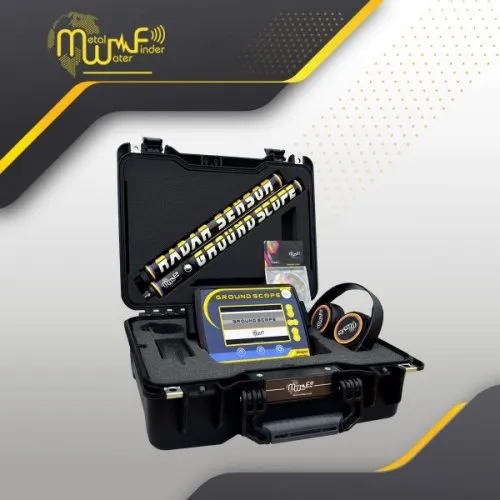
The manufacturer presents MWF Ground Scope 3D with live scanning and area-scanning functions. Its two- and three-dimensional views provide different ways to examine the data. Seeing an immediate change does not establish that a structured area survey has been completed. Learn how each function begins and what output it provides.
Choose a small demonstration area and mark its starting corner. Entered dimensions, selected direction and actual movement should correspond. After the first record, check more than whether a coloured image appears. Be able to explain which edge of the image represents each side of the ground area. Without that connection, later statements about a feature's location may remain uncertain.
Read the manufacturer's technical explanation of the measurement method separately from the display description. Producing a three-dimensional view does not establish the same physical measurement as conventional pulsed GPR. Imaging format and measurement technology are different questions. Asking what the sensor measures helps interpret the colours more accurately.
MWF MF 9700 multi-system use and method selection
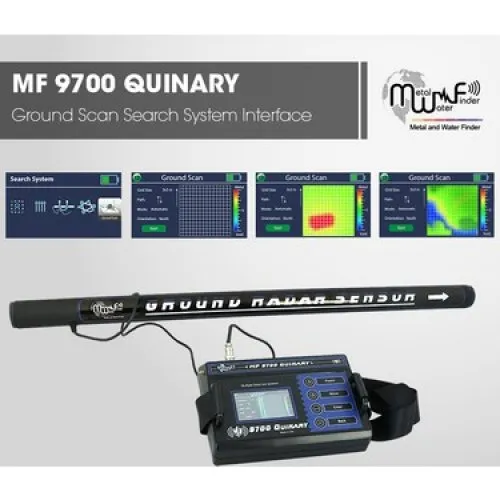
The manufacturer's Quinary documentation discusses several methods for MWF - MF 9700. Names such as Ground Sense, Geophysical and Ground Scan do not have identical technical meanings: the manual distinguishes magnetic-field-related measurements from an electrical-resistance approach. Confirm that the offered version matches the document. Do not treat every MF 9700 name as an identical hardware set.
If several methods are planned, write down the components required for each mode. An electrode-based procedure has different preparation needs from a carried-sensor survey. Include component changes, connection checks and record naming in the time plan. Several available modes do not mean that they operate simultaneously or provide the same information.
For an MF 9700 versus Ground Scope comparison, select a common required workflow. If the objective is an imaging record, compare the relevant mode's setup and review process. Assess the other MF 9700 functions individually when those methods are actually needed. The number of systems that will remain unused is not, by itself, a reason to prefer a device for imaging.
| Comparison topic | Ground Scope 3D | MF 9700 |
|---|---|---|
| Initial assessment | Live and recorded scan workflow | Selection of the required system |
| Hardware check | Relevant imaging components | Mode-specific parts and connections |
| Field planning | Area dimensions and line layout | Separate preparation for each method |
| Record review | Connecting the image to the area | Keeping different data types distinct |
Area dimensions, scales and colours in MWF 3D imaging
The horizontal dimensions of an image depend on the survey layout. If the area walked differs from the area entered in the software, interpreting a displayed feature's size becomes difficult. Record line spacing and starting points. If a section is skipped or an obstacle changes the direction, keep that information with the file instead of relying on memory.
A colour scale defines how measurement values are displayed; it is not a direct material label. Two automatically scaled files may use similar colours for different ranges. Compare the scales and settings first. Without method and scale information, a red area in one image should not be assumed to mean the same thing as a red area in another.
Smoothing an image or making a feature more prominent does not increase the number of measurements collected. Processing can improve readability but cannot turn an unmeasured detail into established field data. Preserve the original and keep processed copies separately. This allows a reviewer to examine which setting made a shape more conspicuous.
A second survey of the same area provides a different kind of information: it helps assess consistency of collection. Note the origin, direction and selected mode for the repeat. Match the records by position and geometry rather than colour resemblance alone. When comparing different methods, preserve the physical meaning of each dataset instead of presenting one indication as automatic confirmation of another.
For a series of surveys, prepare a small record sheet with area name, dimensions, mode, sensor and file name. Add unusual events as they happen. This creates a link between the field session and the saved data without requiring a complicated reporting system. It also helps another person review the files after the operator has left the site.
MWF underground imaging prices
Compare MWF imaging prices using current product cards and written delivery lists. For Ground Scope 3D, identify the imaging equipment supplied. For MF 9700, identify the components belonging to the systems you intend to use. The main unit, sensors, electrodes, connections, power equipment and software should be checked as applicable to the exact model.
Consider the cost of a complete working arrangement alongside the initial amount. Note any viewing device or connection component that must be supplied separately. For a larger package, also assess the budget impact of equipment that may remain unused. A method you cannot practically apply at your site does not automatically make the wider package better value for your project.
Clarify software access, installation and update terms for the particular offer. Seeing an application screenshot does not prove compatibility with your own device. Opening, saving and, where required, transferring a sample record is a more concrete check. Read any stated support and warranty scope rather than assuming identical services across every MWF package.
Which MWF imaging device is best for your work?
The most suitable MWF model is one whose required method you can apply and whose data you can understand. A user wanting a focused imaging workflow may choose differently from a team applying several systems in sequence. In either case, a complete small-area demonstration is useful. Assess preparation, collection and review time together.
The main underground imaging systems category provides alternative options. Within MWF, compare the Ground Scope 3D workflow with the particular MF 9700 system needed for the same objective. Base the decision on method, site conditions and record quality instead of expecting conclusive material identification or a fixed depth. This makes the practical need served by the selected equipment clearer.
Before finalising the choice, identify the steps that still require explanation. They may concern a mode change, a connection, a scale or the meaning of a saved file. Resolve those questions using the documentation for the actual version and a repeatable demonstration. An understandable process is a more useful purchase outcome than a long feature list that cannot yet be connected to the intended survey.
Frequently Asked Questions (FAQ)
Are Ground Scope 3D and MF 9700 the same system?
No. Assess their scope and workflow separately, using the method required for the project.
Does a larger mode count automatically improve imaging quality?
No. The relevant sensor, collection arrangement and interpretation process matter.
Does MWF 3D imaging necessarily mean conventional GPR?
No. Check the physical measurement method in the matching technical documentation.
Do image colours directly identify metal types?
No. Interpret the scale together with the method and processing settings.
Does the MWF price include every system component?
The exact version and written delivery list define the package scope.